
Esko Hybrid Printing Support
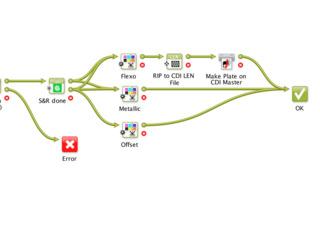

Hybrid printing is occurring much more, especially with the growth of digital print. Today, 70 to 80% of all narrow-web printing machines are hybrid presses, combining more than one printing technique in a single pass, rather than sending a job through a number of presses. With hybrid presses, a converter can print CMYK in high definition flexo while printing brand colors inline with a screen press unit.
While things are easier in the pressroom, prepress efforts are more complicated. Until recently, a workflow for a job that required the combination of different printing techniques couldn’t be automated. It required too many different settings for the same variables—different RIP settings, dot gains, compensation curves, different trapping, and other variables. So, an operator would interrupt and manage a number of different workflows, automated or manual, to ensure quality output of the different image channels for the different processes.
With Esko Hybrid Printing Support, operators can adjust the settings and automatically generate files for platemaking. Operators just set the job to ‘print’. Esko Hybrid Printing Support handles everything automatically, ensuring consistent high quality printing no matter what technology, what substrate, or what inks and inksets are used. It automatically handles separations by tagging them for specific printing processes. Support begins in the editors, where a specific printing process tag is assigned to each individual print separation. Each color in the entire job is identified by print process (flexo, gravure, offset, screen, digital). The workflow engine recognizes the printing method for each separation and can automatically route individual separations to specific workflow operations. Different prepress tasks (and specifications, like trapping) are triggered based upon that tag. The job finally progresses to any RIP—tied to the workflow, or any third-party RIP tied to any of these presses.